How a Workwear Ordering Portal Reduces Admin
A workwear ordering portal brings customer products and pricing together with employee access, monetary or quantity allocations and approvals. Learn how suppliers and customer administrators share the work through one supplier-branded store, reducing manual order collection and clarification.
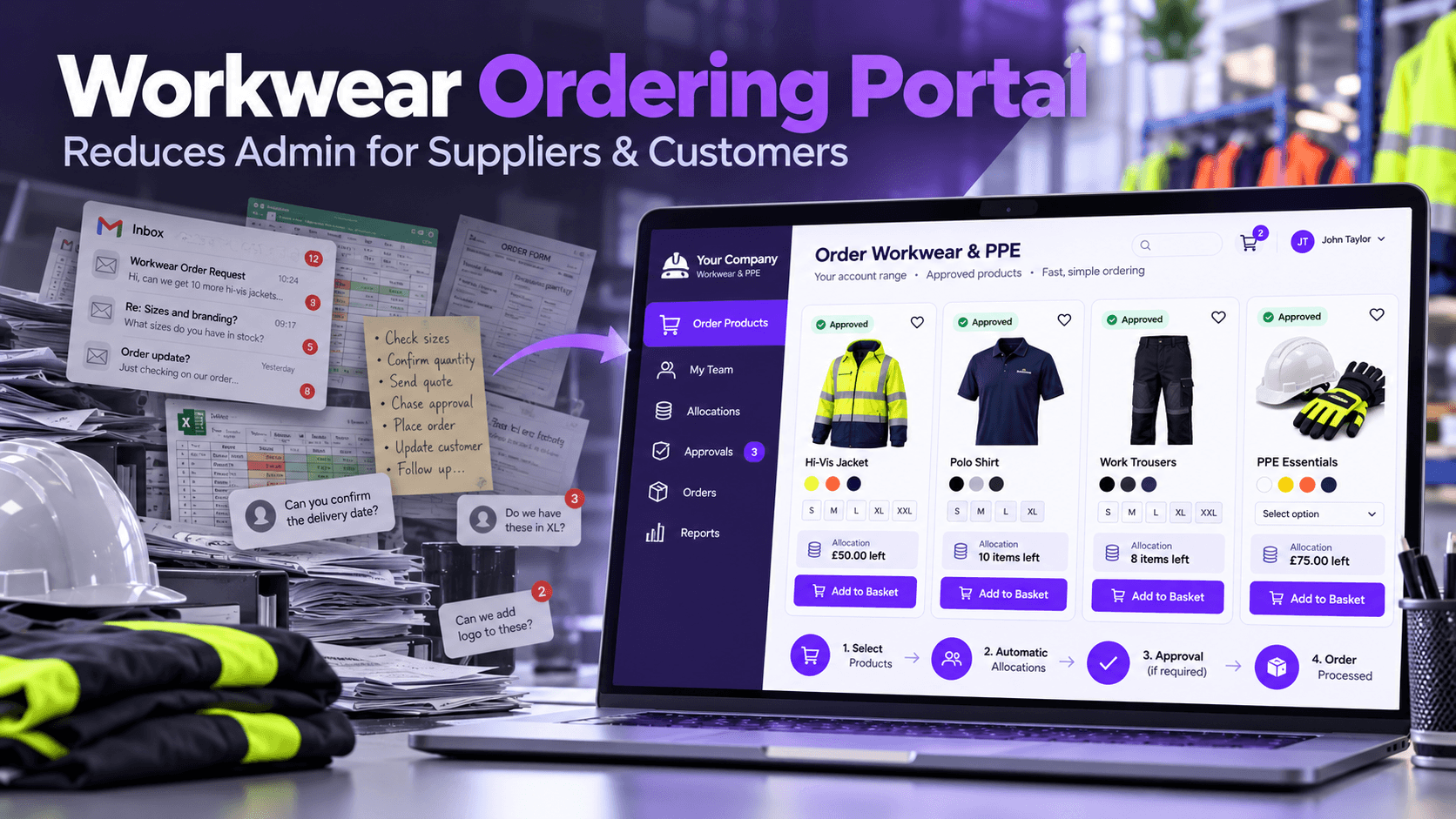
A workwear ordering portal is not simply an online store for uniforms. For suppliers, it is the operating layer that turns recurring business-account orders into a controlled, repeatable workflow. Instead of collecting size lists by email, checking allowances in spreadsheets, confirming prices by phone, and re-entering orders manually, suppliers can give customers a structured way to order within the rules of their program.
That distinction matters when an account has multiple locations, hundreds of employees, negotiated pricing, and different product requirements by role. A generic ecommerce site may accept an order, but it rarely manages the commercial and operational rules behind it. A purpose-built portal keeps those rules in place from customer setup through fulfillment.
The manual ordering problem grows with every account
Most uniform and PPE suppliers can manage a small number of straightforward business accounts through a mix of email, spreadsheets, and experienced customer service staff. The strain appears as accounts grow. A single order may require someone to confirm whether an employee is active, whether they are entitled to a product, whether their allowance remains available, which logo applies, and which price the customer negotiated.
Those checks are necessary, but they should not rely on someone remembering the program details or searching through old correspondence. When information is spread across inboxes, documents, and order-entry systems, the supplier becomes the bottleneck for routine requests. Customers wait for answers, service teams spend time on repeat administration, and errors become harder to prevent.
The most costly mistakes are often quiet ones. An employee orders an unapproved item. A site receives the wrong branded variant. A customer is charged a standard price rather than its contract price. An allowance is exceeded and discovered only after the order has been processed. Each issue creates rework, weakens confidence, and pulls attention away from profitable account growth.
A workwear ordering portal replaces that fragmented process with rules that are visible at the point of order. The customer gets self-service access, while the supplier retains control over what can be purchased and how each order moves forward.
Configure customer rules once, then apply them consistently
The supplier maintains the account’s products, variants and prices within one shared supplier-branded store. Customer administrators manage employee roles, product availability, allocations and approvals. Each account sees its own products and prices after sign-in.
Customer-specific catalogs and pricing
Not every customer should see every product. A construction company may need high-visibility garments and safety footwear, while a hospitality group needs front-of-house apparel in specific colors and styles. Within the same account, managers, field staff, and warehouse employees may each need different approved products.
A well-configured portal presents only the products, product variants, and branding options that apply to that customer or employee group. This reduces incorrect purchases before they happen. It also means negotiated customer-specific pricing is automatically applied, rather than manually checked for every transaction.
For suppliers, this preserves commercial accuracy at scale. Sales teams can agree account terms with confidence, knowing that the ordering process follows those terms consistently. Customer service teams no longer need to police a broad public catalog for every business order.
Product variants need operational control
Workwear programs are rarely as simple as selecting a shirt in small, medium, or large. Products can vary by color, fit, gender, size range, embroidery position, logo, safety rating, and customer-specific decoration. PPE may have compliance requirements that make substitution inappropriate.
The portal should reflect those choices clearly without exposing variants that do not belong in the program. When an employee can only select approved colors, branding, and sizes, the order arrives in a form that is easier to fulfill correctly. The supplier receives fewer clarification requests and avoids the costly cycle of returns, credits, and remakes.
Give customers self-service without giving up control
Business customers want employees to order what they need without sending every request through a central contact. Suppliers want to make that possible without opening the door to uncontrolled spending or unauthorized product selection. The right workflow supports both goals.
Customer administrators manage employees, roles, branch assignments, product availability and allocations. Employees with email can sign in and order from their assigned range. An authorised manager can order on behalf of an employee who does not have an email address.
For accounts with several branches, the customer administrator maintains employee access and relevant assignments within the supplier’s shared store. The store uses the supplier’s logo and URL; customers see account-specific products and prices rather than separate customer-branded portals.
Make allowances and approvals part of the order
Allowance management is where manual processes often become fragile. Customers may provide annual uniform budgets, seasonal allocations, replacement limits, or role-based entitlements. When these are tracked outside the ordering process, someone must check balances after an order request arrives. That creates delays and leaves room for inconsistent decisions.
B2B Orderly supports monetary allowances and quantity allocations. Customer administrators manage the employee’s budget or assigned item quantities, and employees can review their available allocation while ordering. An order above the applicable allocation can require approval.
Approval within the employee ordering workflow gives the customer administrator a way to review an allocation exception. Requests outside the available product range need a separate discussion about access. This keeps the customer involved in the decision and gives employees a clear place to raise an allocation exception.
Online orders provide the supplier with clearer items, selected variants, quantities, customer prices and configured add-ons. Customer administrators handle employee allocations and approval decisions, while supplier staff process the resulting orders.
Improve fulfillment by receiving better orders
A portal does not replace the need for reliable inventory, decoration, picking, and shipping processes. It improves the quality of the information entering those processes. That is a meaningful operational gain.
When orders arrive with selected variants, configured customer prices and add-ons, supplier staff spend less time interpreting free-form requests. B2B Orderly supports order acceptance, preparation, shipping and delivery updates within its supplier order-management workflow.
Employees use the same supplier store but see the products available to their account and assignments. This gives the customer a consistent place to order while keeping customer pricing and employee access distinct. PPE suitability remains a decision for the customer and supplier, supported by accurate product information.
What suppliers should evaluate before launching a portal
A portal delivers value only if it matches the complexity of the accounts it is meant to serve. Before selecting or building a solution, suppliers should examine the operational rules that currently create the most manual work. Four areas usually reveal whether a platform is fit for purpose:
Check four areas with a representative account: account-specific products and prices within one supplier-branded store; customer administration of employees, roles and product availability; monetary or quantity allocations and approval of allocation exceptions; and accurate size, colour and variant selection.
The answers should be based on real customer programs, not a simplified demonstration account. A supplier serving a few basic uniform accounts may prioritize fast deployment and a clean ordering interface. A supplier managing complex PPE, multi-site, or contract-based programs will need deeper control over eligibility, exceptions, and customer-specific rules.
The implementation process matters as well. Start with a well-defined customer program, document the products and approval rules, and test the experience with the people who will use it. Customer administrators need to understand how to manage employees and allocations. Internal teams need confidence that portal orders fit their fulfillment process. A controlled rollout usually creates better adoption than trying to migrate every account at once.
B2B Orderly brings customer products and prices, employee ordering, allocations, approvals and supplier order management together. Suppliers maintain account commercial settings and fulfilment, while customer administrators manage their employees and allocations. That division reduces repeated account administration.
A useful workwear programme makes routine ordering clear for employees and gives administrators a practical way to manage access and allocations. The customer still decides its uniform and PPE requirements. Keeping ordering information in one workflow can reduce spreadsheets and follow-up.