How B2B Orderly works

One platform for your entire B2B ordering process.

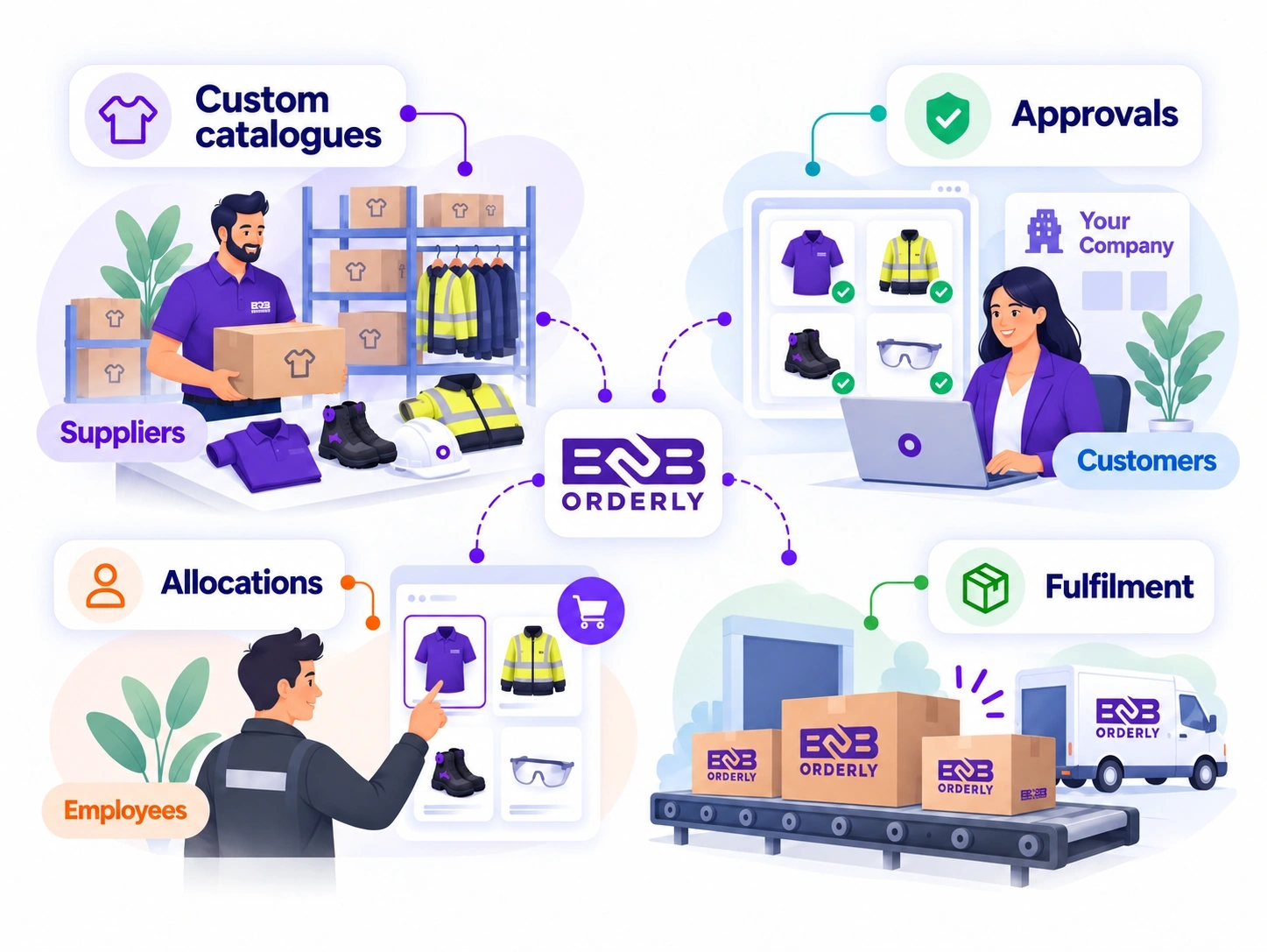
B2B Orderly connects suppliers, business customers and their employees through a structured ordering process.

Set up your products and customer accounts, assign the right products and pricing, and give employees a straightforward way to order the uniforms, workwear or PPE they are allowed to receive. Your team can then manage those orders through to fulfilment without relying on separate spreadsheets and email requests.

Built for uniform, workwear and PPE suppliers managing orders for multiple business customers.

Supplier administration and supplier-branded store workflow illustration, not an actual product screenshot
The ordering process

How B2B Orderly works, step by step.

The process starts with the supplier configuring the products and customers it serves. From there, each customer can manage its employee ordering arrangements, and orders flow back to the supplier for processing.

  1. 1

    Set Up Supplier Products & Pricing

    Set up products, variants, pricing and catalogues for your business customers.

  2. 2

    Configure Your Store & Customer Accounts

    Set up one supplier-branded store and configure the products, pricing and ordering rules for each customer account.

  3. 3

    Customers Manage Employees & Allocations

    Customer administrators manage employees, roles, allowances and approval requirements.

  4. 4

    Employees Order Through Your Store

    Employees select approved products and place orders within their assigned ordering rules.

  5. 5

    Supplier Processes & Tracks Orders

    Suppliers receive, process and fulfil orders while tracking their progress through the platform.

The workflow in detail

Follow an order from catalogue setup to fulfilment.

Each stage carries the customer’s products, pricing and ordering rules forward, so the supplier receives a structured order with the relevant context already connected.

Supplier setup

Set up your products and pricing

Start by adding the products your business supplies.

Create your catalogue with product descriptions, images, sizes, colours and other available variants. Maintain your product information and configure the pricing arrangements you use for your business customers.

You can manage uniforms, workwear and PPE within the same supplier platform rather than maintaining separate product lists for every customer. Once your products are ready, you can decide which customers should have access to them.

What you can configure

Store and customer configuration

Set up your supplier store and customer accounts

Different customers do not need to see the same catalogue or pay the same prices.

B2B Orderly lets you configure an ordering experience around each business customer’s requirements within your supplier-branded store. Assign the relevant products and variants, apply agreed pricing and make the appropriate ordering options available to that account.

For example, one customer might access an approved range of polos, jackets and trousers, while another accesses a different range of workwear and PPE. Both order through the same supplier store without separate spreadsheets or manually maintained price lists.

One supplier-branded store supports customer-specific products, pricing and ordering requirements.

Customer administration

Configure employees, allowances and approvals

Once a customer account is set up, its employee ordering arrangements can be configured.

Customer administrators can manage employees and organise them according to the roles or groups used by their business. This allows employees to have access to the products and ordering rules appropriate to their position.

Employee uniform allowances can control how much an employee is entitled to order. Where an order needs additional review, an approval process can be applied before it continues. A warehouse employee might have an approved workwear range, while a supervisor has additional product options or a different allowance.

Customer administrators can manage

  • Employee accounts and assigned roles
  • Approved products and ordering access
  • Employee allowances and entitlements
  • Approval requirements
  • Relevant employee ordering activity

Employee ordering

Let employees place their own orders

Employees can sign in to the supplier’s online store and select from the products available through their business customer account.

They can choose the required sizes, colours and other permitted product options, review the items they need and submit their order through the platform. Where an employee allowance applies, the ordering process uses the relevant allowance rules. Orders requiring additional approval follow the configured review process.

Employees do not need access to the supplier’s entire catalogue, and managers do not have to enter every routine order on their behalf. Where necessary, authorised managers can also place orders for employees. Learn more about the employee uniform ordering process.

Employees order what they need, within the rules assigned to them.

Supplier fulfilment

Receive, process and fulfil customer orders

When an order is submitted, it enters the supplier’s order management workflow.

Your team can review the order, confirm the requested items and quantities, manage its progress and record fulfilment and delivery information as the order moves forward. The relevant customer, product and employee ordering information is connected to the request because it comes through the customer’s configured experience within your store.

This gives your team a clearer starting point than rebuilding orders from email conversations, spreadsheets or phone calls. You can manage the order from placement through to fulfilment while keeping the relevant order status and history available within the platform.

Explore order management features
A practical example

See how employee uniform ordering works in practice.

Imagine you supply uniforms to a business customer with 150 employees across its warehouse, administration and management teams. Each group needs a different range of garments, and the customer wants to keep spending within its uniform budget. Here’s how that arrangement could work in B2B Orderly.

  1. 1

    The supplier sets up the customer’s uniform range.

    You assign the approved polos, trousers, jackets and other garments to the customer’s account within your store, including the relevant sizes, colours and agreed pricing.

  2. 2

    The customer configures its employees.

    Customer administrators add employees, assign the appropriate roles and configure the allowances and approval rules used by their organisation.

  3. 3

    An employee needs a replacement jacket.

    The employee signs in, finds the approved jacket in their available product range, selects the required size and places an order.

  4. 4

    The ordering rules are applied.

    The employee’s allowance and any applicable approval requirements are considered as part of the ordering process.

  5. 5

    The supplier receives the order.

    Your team can process the request through its usual order workflow, without needing to collect the employee’s product choice and size through a separate email.

The same process can support the customer’s next employee order, whether it comes from a warehouse worker, an office employee or an authorised manager.

This is an illustrative example of how a customer uniform programme can be configured.
Built around your customers

One ordering process. Different customer requirements.

B2B Orderly can support different ordering arrangements without requiring your supplier team to manage each customer through an entirely separate process.

Flexible customer setup

Different customers can use different ordering arrangements.

One business customer may allow employees to place their own orders. Another may require managers to handle ordering or approve certain requests. B2B Orderly lets suppliers support different customer ordering arrangements within the same platform.

Common questions

Questions about how B2B Orderly works

Does every business customer get its own ordering portal?

No. Each supplier has one supplier-branded online store that its business customers and their authorised employees use to place orders. Each customer can have its own approved products, pricing and employee ordering rules within that store. Customers do not need separate ordering websites.

Can business customers manage their own employees?

Yes. Authorised customer administrators can manage employees and their relevant ordering setup, including roles, available products and applicable allowance or approval rules.

Can different employees see different products?

Yes. Product access can be configured around the customer’s ordering arrangements and the employee’s assigned role or group. This allows employees to order from the range available to them rather than browsing the supplier’s entire catalogue.

Can employees order directly, or does a manager have to place every order?

Employees with access to the supplier's online store can place their own orders. Where an employee does not order directly, an authorised manager can place an order on their behalf.

What happens if an employee needs to order beyond their allowance?

Where the customer’s configuration requires approval for an order outside the employee’s normal allowance, the order can follow the applicable approval process before proceeding.

Can different business customers have different prices?

Yes. Customer-specific pricing allows suppliers to configure agreed prices for different business customer accounts. This means customers can order using the pricing assigned to their account.

What happens after a customer places an order?

The order enters the supplier’s order management workflow. Your team can review and process the order, update its status and manage fulfilment and delivery information as it progresses.

See how B2B Orderly could work for your supplier business.

Every supplier has a different mix of products, business customers and ordering requirements. Tell us how your current process works, and we’ll show you how B2B Orderly can bring your customer ordering, employee management and supplier fulfilment into one connected platform.

Explore the supplier and customer ordering experience during a guided 14-day trial, test the workflows that matter to your business and get answers to your implementation questions.