How to Prevent Unauthorized Uniform Purchases
Prevent unauthorised uniform purchases by controlling approved catalogues, role-based product access, employee allocations and exception approvals before checkout. Learn how customer administration and clear ordering rules reduce after-the-fact checks while keeping routine replenishment straightforward.
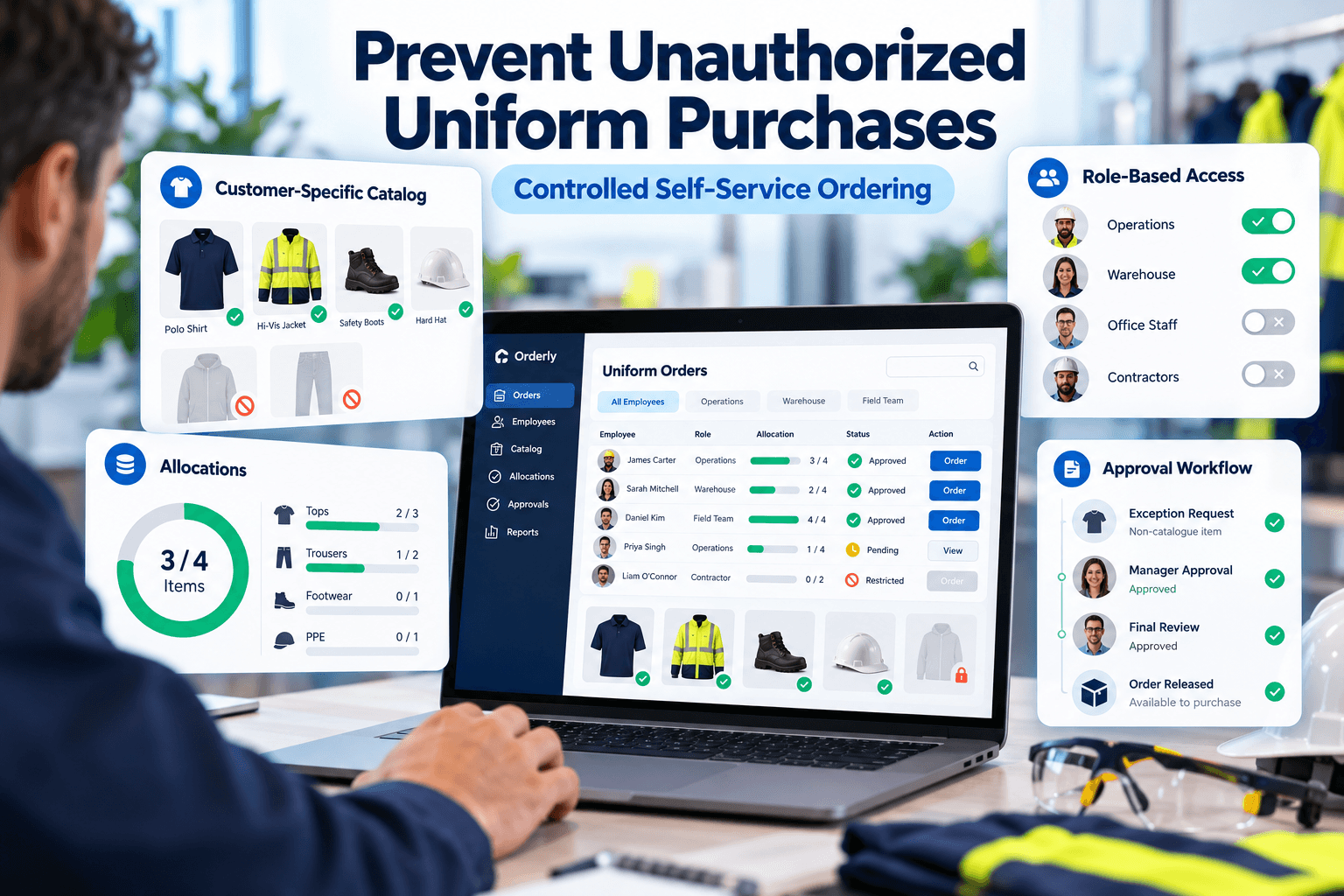
A uniform order outside the agreed programme often creates extra work. To help prevent unauthorized uniform purchases, suppliers maintain customer products and pricing while customer administrators manage employee access, allocations and approvals. Clear settings reduce the need to investigate each request after it reaches the supplier.
For uniform, workwear, and PPE suppliers, the issue is not simply stopping people from ordering. Business customers still need employees to replace worn garments, order required safety equipment, and access role-appropriate product variants without waiting for a manual response. The goal is controlled self-service: routine orders move quickly, while exceptions follow a clear rule.
Why unauthorized purchases create supplier friction
Unauthorized purchases take several forms. An employee may select a premium jacket instead of the approved standard issue, order an item assigned to a different department, exceed an annual allocation, or use a catalogue price intended for another customer. A site manager may place an urgent order outside the usual process because they cannot see a current allowance balance.
When orders arrive by email, phone, or a general ecommerce store, the supplier becomes the final checkpoint for every exception. Staff must identify the customer program, verify negotiated pricing, confirm the employee's role, check prior purchases, and ask whether a manager has approved the request. That work is slow, difficult to standardize, and vulnerable to error.
The commercial impact is also significant. Incorrect customer-specific pricing can erode margin. Unapproved variants create returns and exchanges. Inconsistent enforcement can cause disputes between a supplier and the customer's procurement team. Most importantly, a program that feels difficult to control may lead customers to limit employee ordering or look for another supplier.
A structured workflow divides the controls clearly. The supplier maintains the customer’s range and prices; the customer administrator maintains employee product availability and allocations. These settings guide routine orders through the supplier’s shared store.
How to prevent unauthorized uniform purchases with rules
The most effective controls are connected. A restricted catalogue alone does not solve overspending if employees can still order unlimited quantities. An allowance system alone does not protect product standards if any item is visible. Suppliers need product access, employee eligibility, commercial terms, and approvals to operate as one customer-specific program.
Start with a customer-specific catalogue
Each business account should see only the products, brands, colors, logos, and product variants approved for its program. This is the foundation of purchase control. A hospitality customer may have approved front-of-house shirts, kitchen apparel, and footwear. A construction customer may require specific high-visibility garments and PPE. Neither should be presented with a generic store containing every item the supplier sells.
Customer-specific catalogues also protect negotiated pricing. Employees should not have to know which products or prices apply to their employer. When the right catalogue is assigned to the account, the correct commercial terms are presented automatically.
This approach reduces accidental non-compliance, but it should allow for deliberate flexibility. Some customers want a tightly controlled core range. Others need seasonal items, optional upgrades, or location-specific garments. Those products can be available to the relevant group while remaining hidden from everyone else.
Match product access to employee roles
Not every employee at the same customer needs the same uniform or equipment. A driver, warehouse operative, supervisor, and office-based manager may all belong to one account but require different product ranges, sizes, and replacement rules.
Customer administrators manage employees, roles, branch assignments and the products available to them. Employees order from that assigned selection and the available variants, rather than interpreting a policy document against the supplier’s full range.
For PPE programmes, the customer must select items suitable for the work involved. Assigned product access helps employees order from that range; it does not assess hazards or certify equipment. Discuss unusual requirements with the customer before changing the available products.
Apply allocations and entitlements before checkout
Product access answers which items an employee can order. Monetary allowances and quantity allocations provide separate controls over value or assigned item quantities.
B2B Orderly supports monetary allowances and quantity-based allocations. Customer administrators can manage an employee’s budget or the quantity of assigned garments, according to the organisation’s requirements. Keep that allocation distinct from the customer’s policy on when worn PPE needs replacement.
The key is visibility. Employees and administrators should be able to see the available balance before an order is submitted. When balances are checked manually after checkout, an otherwise routine purchase becomes a customer-service task. When the available allowance is presented within the ordering experience, employees can make an informed choice and managers receive fewer avoidable requests.
Customer administrators should review allocation settings when the uniform policy changes. Keep any replenishment or balance limits clear, and handle damaged-item requests with the customer. An allocation setting is not a substitute for assessing whether PPE needs replacement.
Route exceptions through approval rules
An allocation exception should have a clear review process. Use the supported employee ordering and approval workflow so the customer administrator can consider the request with its order details.
An employee order above the applicable allocation can require approval. Product access remains separate: an optional or unavailable item needs to be included in the assigned range before it can be ordered. Agree who will review allocation exceptions before employees begin ordering.
Keep routine ordering within assigned products and allocations straightforward, and ensure customer administrators know how to review allocation exceptions. This gives the customer oversight without returning every ordinary request to a supplier’s inbox.
That distinction matters during onboarding. Suppliers should work with the customer to define what is routine, what needs review, and who owns the decision. A rule with no clear approver simply moves the delay from email to a digital queue.
Give customers administration without giving away control
The customer often knows best when an employee joins, changes roles, transfers locations, or leaves the business. Giving a designated customer administrator the ability to add and manage employees keeps the ordering program current without requiring the supplier to maintain every user record.
The supplier maintains customer-specific products, variants, pricing and fulfilment. Customer administrators manage employees, roles, product availability, allocations, approvals and ordering. This division reduces supplier workload while keeping commercial terms with the supplier.
Offboarding is just as important as onboarding. If former employees retain access, they can continue to place orders that appear valid until someone notices. A clear process for deactivating users, combined with account-level visibility of active employees and recent orders, closes a common gap in manual uniform programs.
Replace after-the-fact checks with a controlled workflow
Many suppliers try to prevent unauthorized orders through customer-service vigilance. Experienced staff may recognize an unusual garment or know that a buyer has exceeded their normal issue. But this knowledge is difficult to scale, especially across many accounts, locations, and product variants.
A purpose-built ordering platform makes the control repeatable. Customer rules are configured once and applied each time an employee orders. The supplier does not need to recreate the same decisions across spreadsheets, emails, phone calls, and manually entered orders.
B2B Orderly provides one supplier-branded store with account-specific products and prices. Customer administrators manage employee access, monetary or quantity allocations and approvals. Employees see relevant choices within that account rather than a separate customer-branded storefront.
Measure the exceptions that still occur
No uniform program remains static. New roles are created, product ranges change, sites open, and safety requirements evolve. The exceptions that reach approval are useful signals about whether the program still matches day-to-day needs.
If managers repeatedly approve the same item, it may belong in the standard catalogue for that role. If a particular allocation is regularly exhausted early, the issue may be an unrealistic allowance, poor garment durability, or an employee group that was assigned the wrong entitlement. If approval requests are consistently declined, the catalogue or product descriptions may need to make the policy clearer.
Reviewing these patterns with the customer turns control from a restriction into an improvement process. Suppliers can refine the program without losing pricing discipline or adding manual work to every order.
The strongest uniform ordering programs make the compliant path the easiest path. When employees see the right products, the right price, and the right balance from the start, unauthorized purchasing becomes an exception that is managed deliberately instead of a problem discovered at fulfillment.