Customer Administrator Ordering Tools That Scale
Customer administrator ordering tools let business accounts manage employees, roles, allocations and approvals within supplier-defined catalogues and pricing. This article explains the workflow, what to evaluate in a platform, and how controlled self-service reduces corrections and strengthens supplier relationships.
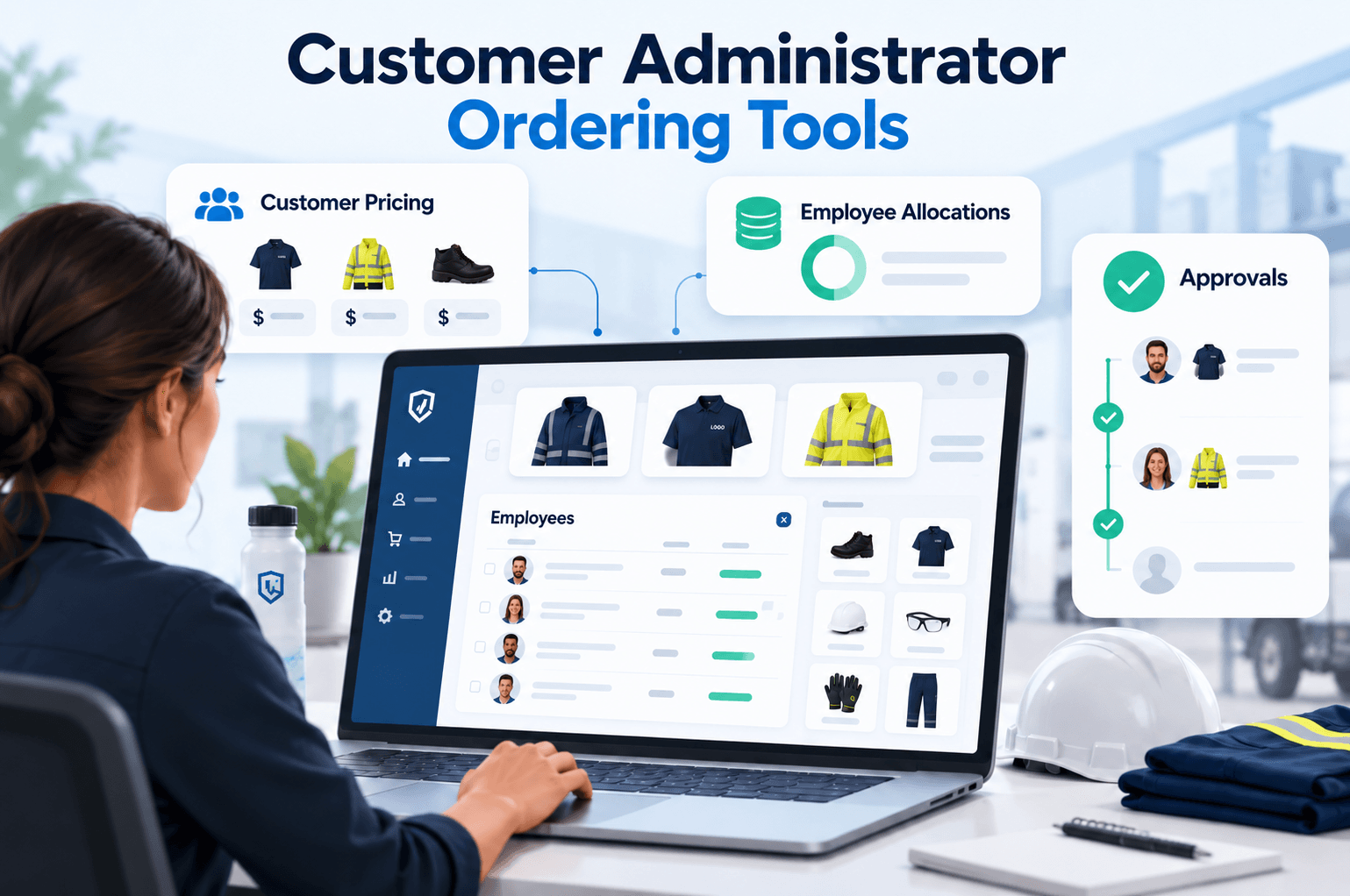
A business customer with 300 employees should not need to email a size spreadsheet, call for a price check, and wait for someone to confirm whether an allowance remains. Yet this is still how many uniform and PPE programs operate. Customer administrator ordering tools replace that fragmented process with a structured workflow where the customer can manage routine ordering while the supplier retains control over products, commercial terms, and fulfillment.
The value is a buying experience that reflects the account’s products, variants and prices within one supplier-branded store. Customer administrators then maintain employee access, allocations and approvals. Keeping these settings current can reduce corrections for both businesses.
Why manual account ordering creates avoidable work
A customer may need different garments for different roles and branches. Employee allocations also need to be maintained as people join or change roles. When an order exceeds an allocation, the customer administrator needs a clear review process.
When these rules live in emails, account notes, spreadsheets, and the memory of experienced customer-service staff, every order becomes a manual check. A customer asks whether a jacket is permitted. A supplier checks a price sheet. Someone verifies an employee's balance. The order is then re-entered into another system. The process may appear manageable for a few accounts, but the administrative load grows quickly as recurring programs expand.
The commercial risk is just as significant. Incorrect pricing erodes margin. Unapproved substitutions create customer disputes. Ordering outside a customer's agreed range can weaken its safety or brand standards. Manual processes also make it harder to give customers the self-service experience they increasingly expect.
What customer administrator ordering tools should control
A useful platform gives customer administrators enough authority to run their own program without giving them unrestricted access to supplier data or commercial settings. The distinction matters. Self-service should remove routine administration, not remove the rules that protect the account.
Customer-specific catalogs and pricing
Each customer should see only the products, colors, sizes, and variants approved for its program. A warehouse team may need high-visibility outerwear and safety footwear, while office-based staff see a different range entirely. The catalog should reflect those differences automatically.
Suppliers maintain the prices configured for each business customer and relevant products or variants. The customer sees those account prices when ordering, which reduces repeated requests for price confirmation.
Employee records, roles, and access
Customer administrators maintain employee records, assign relevant roles and branches, manage product availability, and update access as the workforce changes. Employees need email to sign in themselves; an authorised manager can order for an employee who is recorded without email.
This is where generic ecommerce tools often fall short. Uniform programs are not only about products. They are about who is entitled to receive a product, which size or variant they require, and whether a purchase is routine, exceptional, or prohibited. Role-based access turns those account rules into a repeatable ordering experience.
Allocations and entitlements
B2B Orderly supports monetary allowances and quantity allocations. Customer administrators manage the employee’s budget or assigned item quantities. These are separate controls, maintained according to the customer’s actual uniform requirements.
Customer administrator ordering tools should show available balances at the point of order and apply allocation rules automatically. Employees can understand what remains available before submitting an order. Administrators can review exceptions without maintaining a separate spreadsheet. Suppliers no longer need to calculate eligibility line by line before accepting an order.
There is a trade-off to consider. Highly detailed rules offer tighter control, but they require disciplined setup and regular maintenance when a customer changes its policy. The right approach is to configure the rules that drive frequent decisions first, then use approval workflows for the smaller number of genuine exceptions.
Approval rules that happen before fulfillment
An employee order above the applicable allocation can require approval through the ordering workflow. Customer administrators manage that review. A request for an unavailable product or an employee access change needs a separate update to the relevant settings.
Agree who is responsible for allocation review and test the supported workflow. Keep routine ordering within assigned products and allocations clear so that staff know when they can order and when a decision is needed.
A structured workflow for customer administrators
The supplier sets up the customer account, products, variants and prices. Customer administrators manage employees, roles, product availability, allocations and approvals. Maintain both sides of that setup as commercial terms and workforce needs change.
The customer administrator then manages the people and routine program changes. They can invite employees, assign roles, update employee details, and monitor ordering activity. Employees access only what is relevant to them, place self-service orders within their entitlements, and submit exception requests when needed.
Employees place orders from the assigned range using their available allocations, with review when an allocation exception requires approval. The supplier handles orders through its acceptance, preparation, shipping and delivery workflow. Customer administrators remain responsible for employee allocations and approval decisions.
For suppliers, this separation of responsibilities is commercially useful. Account managers can focus on program reviews and customer growth rather than chasing size confirmations. Customer-service teams spend less time answering repeat questions. Operations receives orders with clearer data and fewer avoidable exceptions.
How to evaluate the right platform
When reviewing customer administrator ordering tools, look beyond a standard online store. A catalog and shopping cart are only the front end. The platform must support the account rules that make B2B uniform and PPE ordering different from ordinary ecommerce.
Check the account’s assigned products and variants, configured customer prices, and employee monetary or quantity allocations. Test an allocation exception and the permissions needed to administer employees or order on their behalf. Employee access and customer pricing are separate settings.
B2B Orderly supports these tasks through one supplier-branded store, customer-specific products and prices, employee ordering, allocations, approvals and supplier order management. Confirm that the supplier’s order-processing steps and the customer’s administration tasks are clear before launch.
Begin with one representative account. Confirm customer products and prices, employee administration, product availability, monetary or quantity allocations, an allocation exception and supplier order processing. Once that setup is understood, use it as a checklist for similar accounts.
Better self-service strengthens the supplier relationship
Controlled self-service is not a way to become less involved with customers. It is a way to be involved where expertise matters most. Customers gain visibility and control over their own employees, budgets, and approvals. Suppliers gain a more reliable way to execute agreed programs at scale.
The strongest ordering experience makes the correct purchase the easiest purchase. When the right catalog, price, entitlement, and approval path are already in place, routine ordering stops being an administrative task and becomes a dependable part of the customer relationship.